Costume Preview Room
The Costume Preview Room lets you try selected costumes before choosing what to buy. Trial copies are temporary and are removed when you leave the room.
 Costume Preview Room
Entrance NPC: Costume Preview Room
Location: hero_tra 88, 81
Preview map: ba_chess
Location: hero_tra 88, 81
Preview map: ba_chess
How It Works
1
Enter the room
Talk to the Costume Preview Room NPC and choose Enter preview room.
2
Choose a trial category
Inside the room, use one of the trial NPCs by costume slot/category.
3
Try costumes
Take trial costumes from the shop, equip them, and check how they look on your character.
4
Use the Stylist
Change hairstyle or hair color inside the room to better match the costume look you are testing.
5
Leave safely
Use the Exit Preview Room NPC. Trial copies are removed automatically.
Room Overview

Screenshot: general view of the Costume Preview Room
Trial NPC Categories
The room is split into several trial NPCs so you can preview costumes by slot without opening one huge list.
Trial Upper
Upper Headgear
Trial Middle
Middle Headgear
Trial Lower
Lower Headgear
Trial Mixed
Mixed Headgear
Trial Garments
Garment Costumes
Trial Auras
Aura Costumes
Stylist Inside the Room
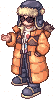 Stylist
The room also includes a Stylist. You can change your hairstyle or hair color while testing costumes,
so it is easier to find the full look that fits your character.
Important Rules
You must enter through the Costume Preview Room NPC.
If you enter the room another way, the system sends you back outside.
Trial costumes are temporary and cannot be kept.
Your own costumes are protected: the system removes only extra trial copies.
If you disconnect or log out inside the room, cleanup runs automatically.
Trading, dropping, vending, buying stores, teleport, warp, memo, branches and commands are disabled inside the room.
Reminder: Trial costumes are only for preview. To keep a costume permanently,
obtain the real item from the Cash Shop or another available server system.